From order to cash close, without losing the thread.
The server takes the order at the table, the bar and the kitchen each get only their part, and payment closes the check. Every sale depletes its recipe from inventory and reaches your cash close.
Open the tableFrom the floor plan you see which tables are free and which are taken, and tap the one you are serving.
Take the orderTap each product. Quantities, each guest's seat and notes, without extra typing.
Send with one tapCocktails go to the bar and food goes to the kitchen. The table is marked as taken.
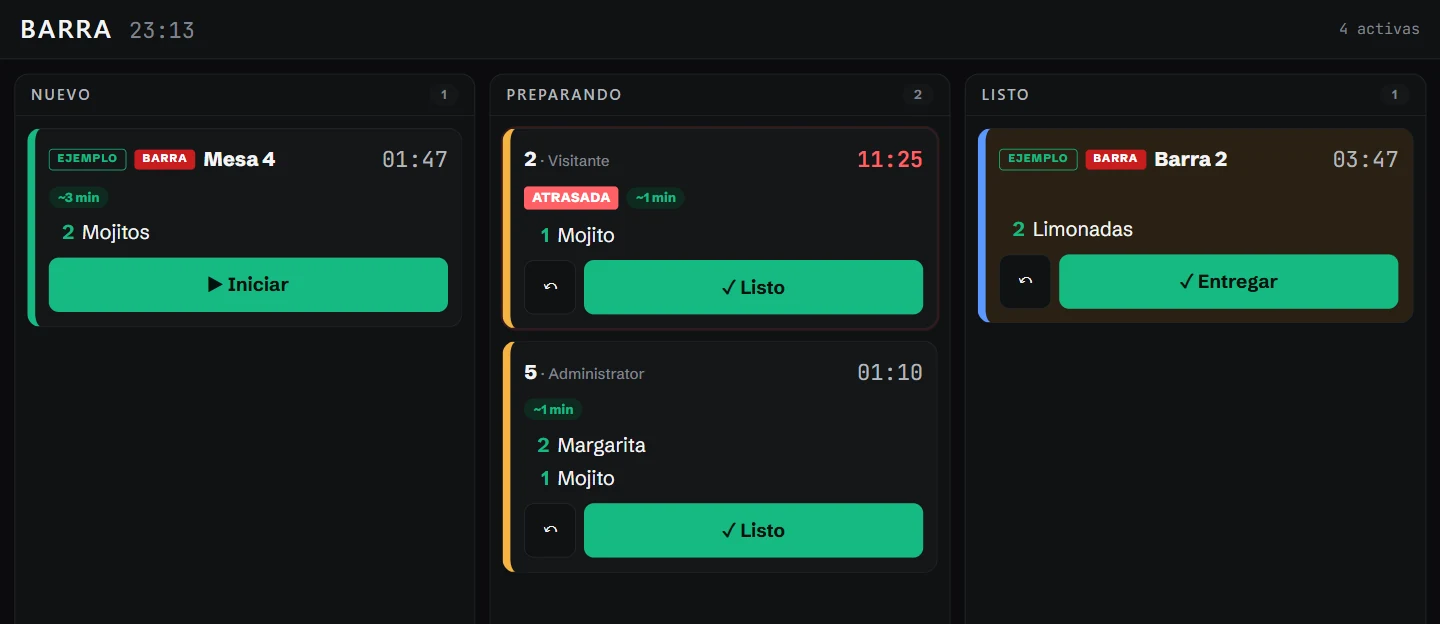
The bar sees it at onceThe order shows up on the bar display as new, with the clock running.
Each station marks its progressStart, ready, deliver. Anything running late is flagged automatically.
The kitchen sees only its partThe food for the same table reaches the kitchen display, without the cocktails.
Take payment at the tableCash or card, with the amount per guest in view. In Los Cabos the environmental fee is added automatically.
Receipt and free tableThe receipt carries its number, 16% IVA itemized and the Los Cabos environmental fee as a separate charge. The table is freed and the sale goes into your cash close.
Real screens from Cabo Cócteles, our demo bar. The names and figures are not a real business. The app is in Spanish.
After payment
A receipt that brings guests back.
The guest scans the QR on their ticket and sees exactly what they paid on their phone. Food and drinks, the Los Cabos environmental charge and IVA appear separately. From that page they can save the receipt, request an invoice or add the visit through WhatsApp.
This is Cabo Cócteles, our demo bar. Try the receipt buttons; the example is in Spanish and uses fictional details.
Cabo Cócteles — Barra Blvd. Paseo de la Marina 245, Cabo San Lucas, BCS, 23450RFC: CCC250101AB9 Tel.: +52 624 105 0100 [email protected]
A los 5 sellos, la casa invita: Margarita.
Recibo digital · AventarIA
Tu visita cuenta
En un recibo real, WhatsApp abre el mensaje de la visita ya escrito.
Al enviarlo, Lia confirma el sello y muestra tu tarjeta.
En la quinta visita, recibes un código para que el mesero aplique la Margarita de cortesía.
Quiero sumar mi visita de Cabo Cócteles.
¡Visita registrada! ●○○○○ Tu tarjeta y tus recibos quedan en tu enlace personal.
Vista ilustrativa. Este ejemplo no abre WhatsApp, registra visitas ni entrega códigos.
Guárdalo en WhatsApp
En un recibo real, este botón prepara un mensaje con el enlace a tu recibo para que lo conserves en tu conversación.
Mi recibo de Cabo Cócteles · $621.73 Enlace personal al recibo
Este ejemplo no abre WhatsApp ni comparte un enlace real.
Solicita tu factura
Desde el recibo real puedes iniciar la solicitud de factura de esta compra y seguir sus pasos.
Este ejemplo no solicita facturas ni recoge datos fiscales.
Try the three buttons. This example does not send messages, register visits or request invoices.
Step by step
What happens on the floor reaches the right station.
Table
You open the table from the floor plan. Taken tables are visible at a glance.
Order
Products, quantities, seat by guest and notes.
Send
One tap sends cocktails to the bar and food to the kitchen.
Bar and kitchen
Each station sees its own tickets and marks new, preparing and ready.
Expediter
One view brings each table's bar and kitchen items together, and what is still missing.
Payment
Cash or card, with the amount per guest.
Receipt
The payment is recorded with its number and the table is freed.
Close
The sale depletes its recipe and goes into the shift's cash close.
Bar and kitchen displays
Each station, with its own display.
Orders arrive on their own and move with one tap: start, ready, deliver. The clock runs on each card and anything late turns red.
Current floor planColors distinguish free tables, those ordering and those waiting to pay.
Activity and timeThe list shows minutes at each table and flags those running longer than usual.
Table checkOpen a table to see its items, VAT and total before closing the check.
Real screens from the fictional demo bar. Open the image to explore three views; close with “× Close,” Esc or a tap outside.
The floor, live
Free and occupied tables, with each check a tap away.
The floor plan shows each table’s status. The activity view shows elapsed time and flags long waits; open a table to see its items and total.
Connected work
Each sale informs the rest of the operation.
What you sell depletes inventory by recipe, feeds the suggested order in Purchasing and reaches the summary and cash close in Manage. Point of sale is part of the Operación plan. See pricing